How to photograph an empty home for virtual staging
Good virtual staging starts with a good photo. How to photograph an empty home: daylight, camera angle, open-plan rooms from both ends and the floor plan.
· 6 min read

Photograph an empty home in daylight, with the camera level at about chest height and from a corner so the floor shows. Shoot open-plan rooms from both ends, include the floor plan and upload the original files. Virtual staging then has a good base, because it keeps the room, the light and the camera angle as they are in the photo.
Virtual staging adds the furniture, but it takes everything else from the photo as it is. That is why the way you photograph an empty home decides most of how the finished listing photo looks: a dark, tilted or blurry photo stays that way once it is furnished. Below are the main questions one by one, with a checklist for the day of the shoot at the end.
When should you photograph an empty home?
Photograph an empty home at the brightest time of day, with curtains and blinds open. A north-facing bedroom gets the most light then, and in the dark season the bright part of the day is short, so plan the shoot around midday. Photograph the whole home in one session if you can, so the light is the same in every photo.
Should the lights be on when you take the photos?
Bare ceiling bulbs and lamps of different colours are usually best left off. Their glare and colour cast stay in the photo and the furniture does not hide them, while daylight gives an even, natural light.
Do not brighten or flatten the photo too much in editing either. Stailer keeps the photo's own light, so the light you capture is the light buyers and renters see. If you want an evening mood in every photo, for example, you can choose a time of day in the staging settings. Every photo then gets the same light, and at dusk and in the evening the lamps are on.
From what height and angle should you photograph a room?
Photograph a room from about chest height with the camera level, so that walls and door frames stay vertical. A tripod helps, but what matters most is not tilting the camera up or down.
Shoot from a corner or the doorway towards the main part of the room. Virtual staging places furniture on the floor the photo shows, so the floor has to be in the picture. If the photo is mostly ceiling and wall, there is no room left for furniture.
Should you use a wide-angle lens?
A moderate wide angle, yes; an extreme one, no. A wide angle helps to show a small room, but an extreme wide angle stretches the edges of the photo: walls and doors look distorted near the edges, and the room looks bigger than it is. In a small studio flat, the best photo is often taken from a corner that shows the whole floor. The furnished photo then shows that a bed, a table and a sofa fit in the same space.
How do you photograph an open-plan living room and kitchen?
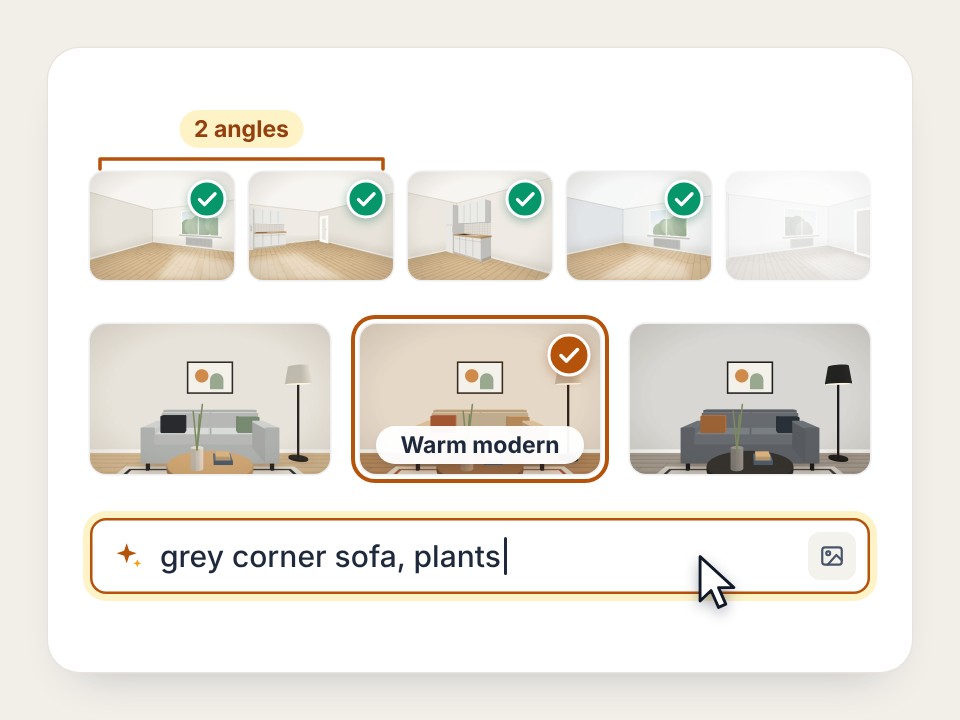
Photograph an open-plan living room and kitchen from both ends. Buyers want to see the space in both directions, and two photos say more about its size than one. It is fine for both photos to show the same part of the room: a shared area helps viewers see that it is one space.
In Stailer, every photo of the same space gets the same furniture in the same places: the first furnished photo is the reference for the others. When you choose photos, we suggest one photo per room and two views of an open living area. Bathrooms, saunas, storage rooms, stairs and garages are left out of the suggestion, and nothing is furnished before you confirm.
Do you need a floor plan for virtual staging?
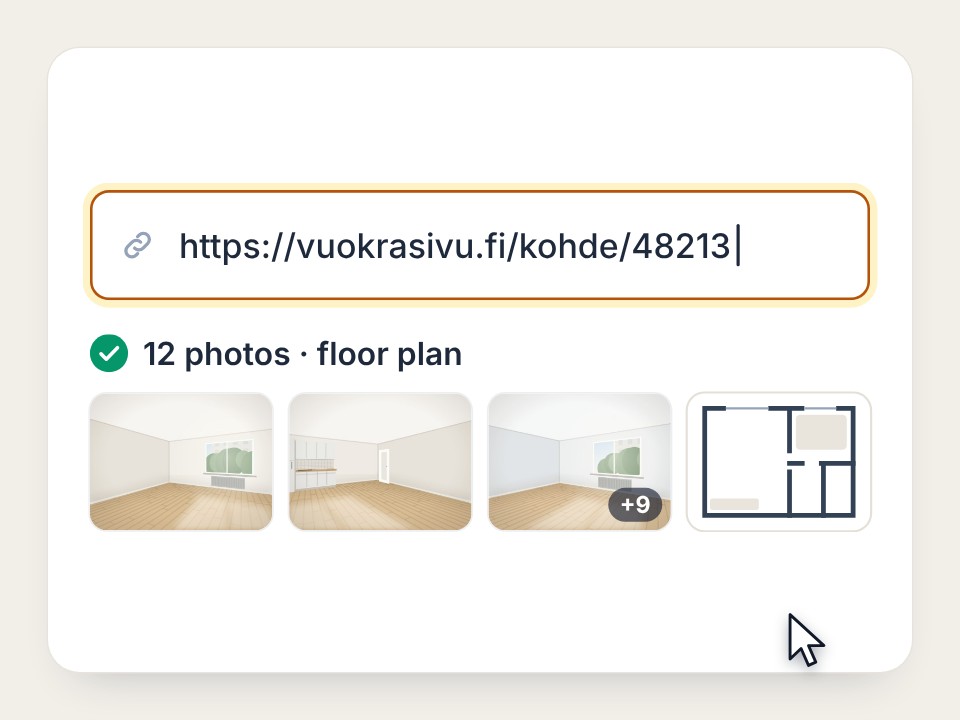
A floor plan is not required, but include it. Stailer reads the floor plan and all the photos, plans each room's furniture once and places the furniture the same way in every photo. Without a floor plan, matching furniture across photos of the same room is less certain.
When you paste a listing link from Etuovi or Vuokraovi in Finland, the photos and the floor plan are fetched automatically. When you upload the photos yourself, add the floor plan too.
What can virtual staging not fix?
Virtual staging adds furniture and decoration, but it does not fix the photo. Things left behind, dirty windows, blur and tilted lines stay in the photo. The walls, windows, floors, fixed fittings, the view outside and the camera angle stay as they are too. That is why preparing for the shoot pays off: virtual staging works best in empty, clean rooms.
Photographing an empty home: a checklist
- Clear the floors. Things left behind, boxes and cables stay in the photo.
- Clean the windows and open the curtains. The windows and the view outside stay in the photo as they are.
- Decide on the doors. Close or open them the same way in every photo.
- Shoot in daylight and in one session. Turn bare bulbs off.
- Keep the camera level at chest height. Shoot from a corner so the floor shows.
- Photograph each room from two spots. You pick the better one later, and for open-plan rooms you use both.
- Include the floor plan. With a listing link it comes automatically.
- Use the original files. Upload the photo as it came from the camera or phone, not a screenshot or a compressed copy, and check that it is sharp.
When the photos are ready, paste the listing link in the studio or upload the photos and the floor plan yourself. You can also read how the options for virtual staging compare.
Frequently asked questions
Can you photograph an empty home with a phone?
Yes. Hold the phone level and steady, shoot in daylight and upload the original photo. If walls and doors stretch at the edges of the photo, switch from the widest lens to a less extreme one.
Should the photos be landscape or portrait?
A landscape photo shows more of the room and usually suits listing galleries best. Stailer furnishes portrait photos too.
What size is the furnished photo?
Stailer delivers the furnished photo full size and ready for the listing, usually the same size as the original photo. It is not a small preview, so it can go straight into the listing.
Do virtually staged photos have to be labelled?
It is good practice: label the photos as virtually furnished in the listing and keep the originals available. Stailer's photos carry a small "Digitally furnished" label by default.